

Meal Planning PDFs: Printable Templates for Busy Home Cooks
Download a ready-to-print meal planning PDF and you can have this week’s meals mapped out in 15 minutes flat. The fastest starting points: Ebook-warehouse’s curated meal prep eBooks (instant download, print-ready PDF format, works on phone or desktop), the Xavier University meal plan worksheet (one page, free, covers breakfast through dinner plus a grocery list), and the EasyDigitalDIY multi-page planner pack (daily, weekly, monthly pages, categorized grocery list, no editing tools required).
- Ebook-warehouse meal prep PDFs: Curated downloadable files covering weekly planning, recipes, and grocery breakdowns. Instant access after purchase, US Letter format, readable on any device.
- Xavier University worksheet: Single-page printable with meal slots for every day and a built-in grocery list. Free, no sign-up.
- EasyDigitalDIY planner pack: Multi-page free download with daily, weekly, and monthly layouts plus recipe card pages.
- Well Plated weekly planner: Menu suggestions paired with a printable weekly planner and per-serving cost notes, useful for families watching a grocery budget.
Print tip: Set your printer to US Letter, portrait orientation, and “fit to page” before printing. A quick print preview saves wasted paper.
Key Takeaways
A ready-to-print meal planning PDF, used consistently each week, is the single most effective low-effort system for cutting grocery waste and weeknight decision fatigue.
| Point | Details |
|---|---|
| Start with a free printable | Xavier University’s worksheet and EasyDigitalDIY’s pack are reliable, no-sign-up downloads you can print today. |
| Match template type to your household | One-page weekly planners suit most households; batch-cook and diet-specific templates add structure for bigger goals. |
| Build the grocery list from the plan | Go meal by meal, group by store section, and shop once per week to cut time and impulse buys. |
| Customize with Canva or Google Slides | Layer editable text over any static PDF or rebuild the layout in Slides for a reusable weekly master. |
| Ebook-warehouse for complete packages | Curated downloadable PDFs with recipes, dietitian-informed content, and multiple layouts, available as instant downloads. |
Table of Contents
- What does a good meal-planning PDF actually include?
- Which template type fits your household?
- How do you pick the right meal-planning PDF?
- How to use a meal-planning PDF this week
- Free vs. paid meal-planning PDFs: what’s the real difference?
- How to customize a downloaded PDF or build your own
- Recommended meal-planning downloads from Ebook-warehouse
- Why starting simple is the right call
- Ebook-warehouse has complete meal-planning bundles ready to download
- Sources
What does a good meal-planning PDF actually include?
Most people download a template, glance at it, and realize it’s missing something they need. Here’s what a solid file should have before you commit to printing 10 copies.
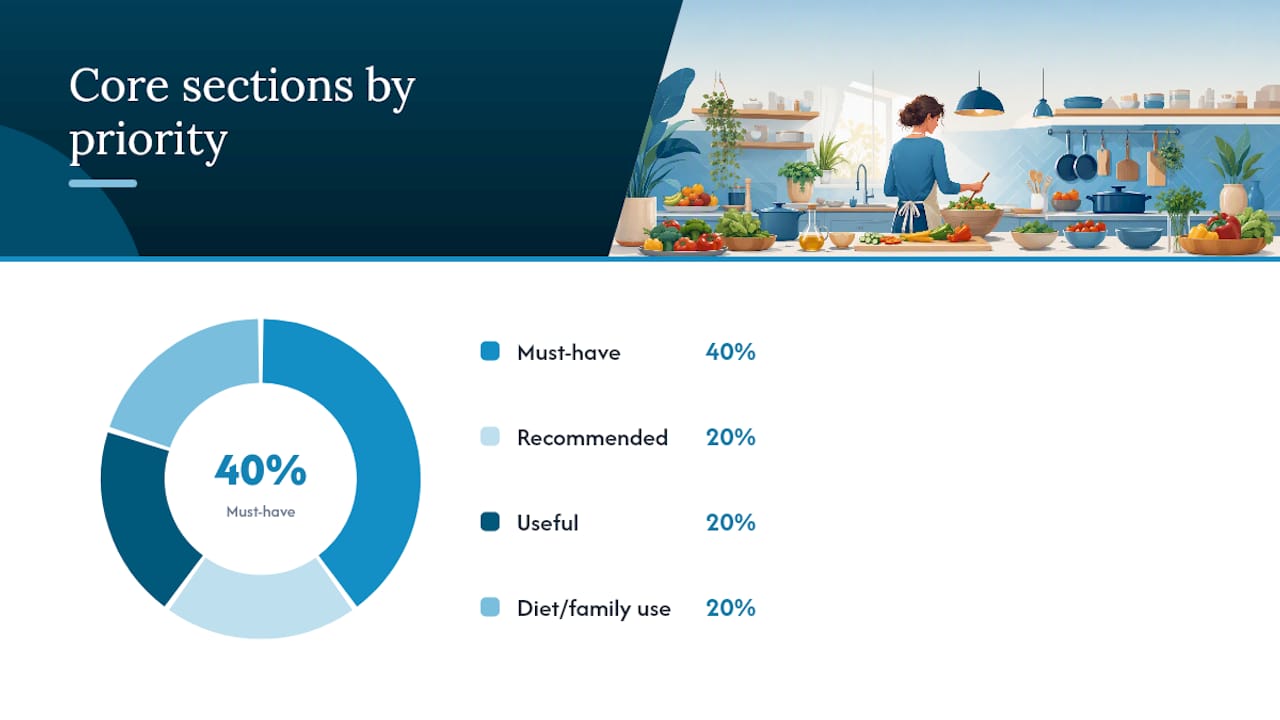
Core sections to look for:
| Section | What it does | Must-have? |
|---|---|---|
| Weekly calendar grid | Slots for each day and each meal (breakfast, lunch, dinner, snacks) | Yes |
| Grocery/shopping list | Organized by category or blank lines for your list | Yes |
| Recipe or prep notes | Space to jot cook times, marinades, or batch instructions | Recommended |
| Pantry/inventory check | Reminds you what you already have before you shop | Useful |
| Serving/yield fields | Helps scale recipes for 1 person vs. a family of 5 | Diet/family use |
File features worth checking:
- Editable fields vs. static PDF: Editable PDFs let you type directly; static ones require printing and handwriting. Both work, but know which you’re getting.
- Page size: US Letter (8.5 × 11 inches) prints cleanly on any home printer. A4 files clip slightly on US printers.
- Single-page vs. multi-page pack: A one-pager sticks to the fridge easily. A multi-page pack gives you room for recipes and a full pantry list.
- Print margins: Narrow margins look clean on screen but cut off on some printers. Check the preview first.
The Allina Health creative meal-planning guide is a good example of a structured multi-page layout that integrates planning pages with recipe ideas, which shows what a professionally produced file can look like.
Which template type fits your household?
Not every planner works for every kitchen. The format that suits a single person batch-cooking on Sundays is completely different from what a family of four needs posted on the fridge.
- Weekly one-page planners: The simplest format. Seven days, three to five meal slots per day, a grocery list at the bottom. Best for quick weekly rotation and fridge posting. If you’ve never used a meal planner before, start here.
- Meal-prep and batch-cook planners: These add a prep-day checklist, storage notes (container size, freeze-by date), and sometimes a protein/grain matrix. Built for people who cook once and eat four times.
- Family and large-household planners: Wider grids, multiple serving-size fields, and often a kid-friendly meal slot or snack column. The Well Plated weekly planner pairs menu suggestions with per-serving cost estimates, which is exactly what a family managing a grocery budget needs.
- Diet-specific planners (keto, vegan, calorie-targeted): Include macro fields, net-carb columns, or specific recipe slots. Worth the extra complexity only if you’re actively tracking nutrition. Ebook-warehouse’s gluten-free meal prep eBook is a good example of a diet-specific downloadable that goes beyond a blank template.
- Pocket shopping lists and modular packs: Separate grocery pages you can tear off or print alone. Useful for shoppers who already know their weekly meals and just need a store-ready list.
Pro Tip: Start with a simple weekly sheet for two or three weeks. Once filling it out feels automatic, graduate to a multi-page pack with recipe cards and a pantry inventory.
How do you pick the right meal-planning PDF?
Five minutes spent choosing the right file saves you from printing a template you’ll abandon by Wednesday.
Start with your use case. Weekly planning for one person needs a different file than batch cooking for a family or tracking macros for a fitness goal. Be honest about which of those describes you.
Check the format before downloading. A single-page printable is fastest to use but has no room for recipes. A multi-page pack is more powerful but takes longer to fill out each week. Editable PDFs work well on a tablet or laptop; static PDFs are better if you prefer pen and paper.
Look at what’s bundled in. A grocery list is non-negotiable. A pantry inventory and recipe card section are worth having if you cook from scratch regularly. Macro fields matter only if you’re counting calories or following a specific diet plan.
Think about customization. If the template’s layout doesn’t match how you cook, you’ll stop using it. Editable text fields or a Canva-compatible version let you swap in your own meal names, adjust serving sizes, and add notes without reprinting a blank sheet every time.
Time vs. depth tradeoff. A free printable takes 30 seconds to download and print. A paid downloadable pack from a source like Ebook-warehouse takes a few minutes to purchase and open, but it comes with built-in recipes, curated plans, and sometimes dietitian input that a blank template can’t give you.
How to use a meal-planning PDF this week
Downloading the file is the easy part. Here’s a repeatable weekly routine that takes 15–20 minutes.
- Pick 3–5 dinner mains. Choose proteins or dishes you already know how to cook. Variety matters less than actually cooking them.
- Slot breakfasts, lunches, and snacks. Breakfasts and lunches can repeat. Snacks can be a single line (“fruit + nuts”) rather than a full recipe.
- Build your grocery list from the plan. Go meal by meal, write every ingredient you don’t already have. Group by store section: produce, dairy, proteins, frozen, pantry.
- Pick one prep day. Sunday works for most households, but any day before your busiest stretch is fine. Block 60–90 minutes.
- Batch-cook on prep day. Cook a large protein (roast chicken, ground beef, lentils), a grain (rice, quinoa), and pre-chop two or three vegetables. Label storage containers with the date and portion size.
The FMCHealth meal planning guide outlines a similar approach, noting that having prepped components on hand is what makes weeknight cooking fast rather than stressful.
Pro Tip: Map your grocery list to the physical layout of your store: produce first, then dairy, then proteins, then frozen. A store-mapped list cuts shopping time by roughly a third compared to a random list.
Free vs. paid meal-planning PDFs: what’s the real difference?
Free templates are genuinely useful. Paid ones do more. Here’s where the line actually falls.
| Feature | Free PDF | Paid PDF/Bundle |
|---|---|---|
| Editable text fields | Rarely | Usually included |
| Multiple layouts (daily, weekly, monthly) | Sometimes | Standard |
| Recipes included | No | Yes |
| Dietitian-reviewed content | Rarely | Often |
| Grocery list with categories | Basic | Detailed, categorized |
| Macro/nutrition fields | No | Yes (diet-specific packs) |
Free PDFs from universities and health systems, like the Xavier University worksheet, are reliable because they’re built around balanced meals and practical grocery-list functionality. They’re the right call when you want something to print and use today.
Paid packs earn their price when you want recipes built into the planner, multiple layout options for different weeks, or guidance that reflects dietitian input. The Allina Health guide shows what professionally produced content looks like: structured planning pages, recipe integration, and health-context framing that a blank printable simply can’t replicate.
The practical rule: choose free if you want speed and low overhead. Choose paid when you want a complete system with recipes, curated plans, or coach-level structure.
How to customize a downloaded PDF or build your own
You don’t need design skills. Three tools handle most customization needs.
- Canva (free tier): Upload a static PDF as an image, then layer editable text boxes over it. Swap placeholder meals for your own, adjust font size, and export back to PDF. Takes about 10 minutes once you know the workflow.
- Google Slides or Docs: Copy the layout structure into a new Slides deck (one slide per week). Type directly into text boxes. Export as PDF when done. Best for people who want a clean, repeatable template they can update each Sunday without reprinting a new blank.
- Browser-based PDF editors (Smallpdf, PDF24): Open a static PDF, add text annotations over blank fields, and save. No download required. Works well for one-time edits but less practical for weekly reuse.
For print output: Set page size to US Letter in your export settings, check the print preview for margin clipping, and save a clean “blank master” copy before you fill anything in. That way you always have a fresh version to reuse.
The EasyDigitalDIY planner pack is worth downloading before you build your own, because seeing how a multi-page pack structures its recipe cards and grocery categories often saves you from reinventing a layout that already works.
Recommended meal-planning downloads from Ebook-warehouse
Ebook-warehouse’s downloadable PDFs go beyond blank templates. Each file is a curated resource with built-in content, not just empty fields to fill.
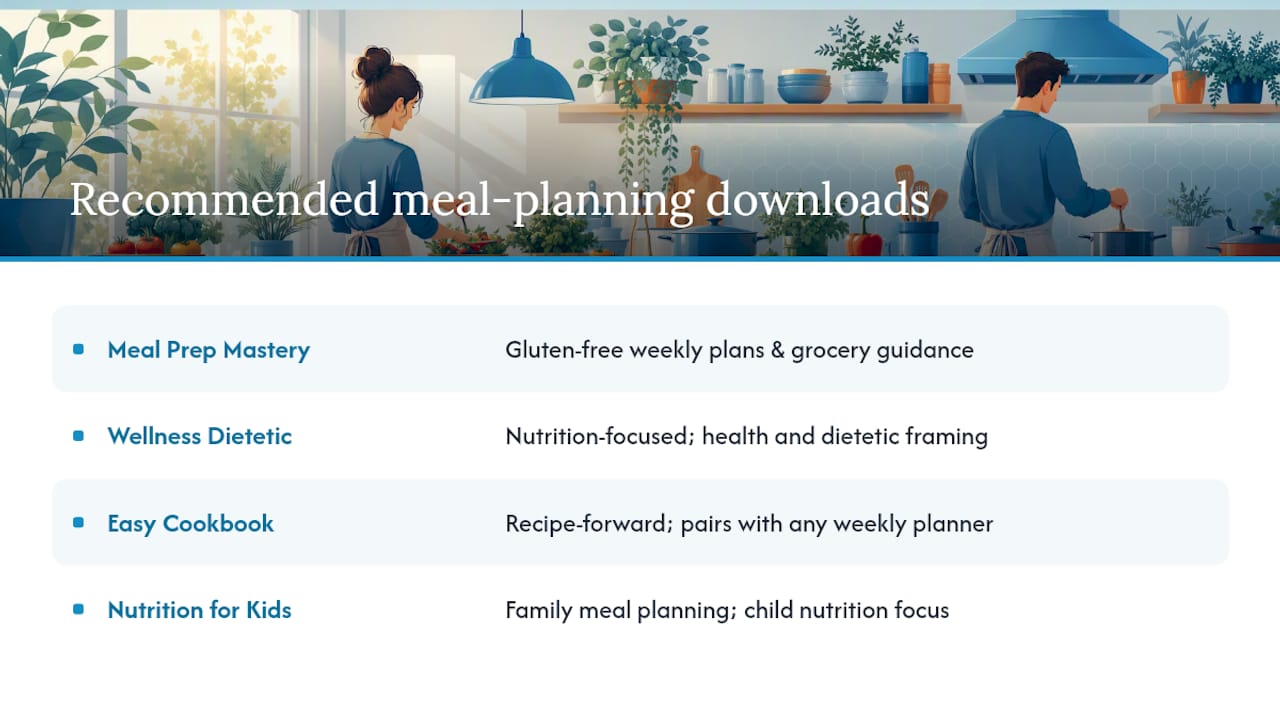
Meal Prep Mastery Gluten-Free: A diet-specific downloadable covering gluten-free weekly plans, prep instructions, and grocery guidance. Best for anyone managing a gluten intolerance or following a gluten-free diet by choice.
Wellness Dietetic: Nutrition-focused content with a health and dietetic framing, closer to the dietitian-backed style of the Allina Health guide than a generic blank planner. Good for readers who want health-context guidance alongside their weekly structure.
Easy Cookbook: Recipe-forward download that pairs naturally with any weekly planner. Use it alongside a free printable template to fill your meal slots with tested recipes rather than guessing what to cook.
Nutrition for Kids: Built for family meal planning with a focus on children’s nutritional needs. Useful for parents who want their weekly planner to reflect age-appropriate portions and balanced meals.
All files are instant downloads in PDF format, readable on any device, and print-ready at US Letter size. If you want to see what a curated collection looks like before committing, start with a free printable from the sources above, then come back when you’re ready for recipes and structure.
Why starting simple is the right call
The gap between “no meal plan” and “meal planned” is smaller than most people think. A single printed page, filled out on Sunday evening, changes how the whole week runs. You stop making decisions at 6 PM when you’re tired and hungry, and you shop once instead of three times.
What practitioners consistently recommend, and what resources like the Greatist meal prep cookbook roundup reinforce, is starting with a ready-made template or structured guide before building a custom system. The habit forms around the routine, not the tool. A simple planner you actually use every week beats a beautifully designed custom PDF you open twice.
Ebook-warehouse has complete meal-planning bundles ready to download
Blank printables get you started. When you want recipes already slotted in, multiple layout options, and content that reflects real nutritional thinking, a curated download does the work a blank template can’t.
Ebook-warehouse’s top cooking and meal-planning eBooks give you a complete package: tested recipes, weekly structure, and grocery guidance in a single instant download. No waiting, no subscription, no recurring charge. Buy once, download immediately, and use it on any device or print it at home. Check the collection for current bundle offers, including multi-title deals that pair a meal planner with a recipe-focused cookbook.
Sources
- Meal plan worksheet (Xavier University)
- Free Meal Planner Template (Printable PDF) (EasyDigitalDIY)
- Weekly Meal Plan 8.2.26 (Well Plated)