

Best Ebook Reader Apps for 2026: Top Picks Reviewed
What are the best ebook reader apps right now?
The top ebook reader apps in 2026 are Amazon Kindle, Google Play Books, Kobo Books, Moon+ Reader, and ReadEra. Each one supports wide device compatibility across iOS, Android, and web browsers, and most let you upload personal files alongside store purchases.
- Amazon Kindle — Best for readers already buying from Amazon. Syncs across Windows, Mac, iOS, and Android with X-Ray character lookups and solid annotation tools.
- Google Play Books — Best for cross-platform readers who want desktop and web access alongside mobile. Easy personal file uploads for PDFs and EPUBs.
- Kobo Books — Best for readers who want audiobooks and eBooks in one app. Syncs bookmarks, highlights, and notes across phone, tablet, Kobo e-reader, and web.
- Moon+ Reader — Best for avid readers with large personal libraries. Supports over 15 file formats and offers deeper customization than any store-tied app.
- ReadEra — Best for readers who prioritize simplicity and offline access. Handles PDFs exceptionally well and works without an account.
Table of Contents
- How do these apps compare on the features that matter?
- How to choose the right ebook reader app for you
- Which apps handle annotation and note-taking best?
- How well do these apps work offline?
- What about security and privacy?
- Ebook-warehouse gives you quality content ready for any app
- Key Takeaways
How do these apps compare on the features that matter?
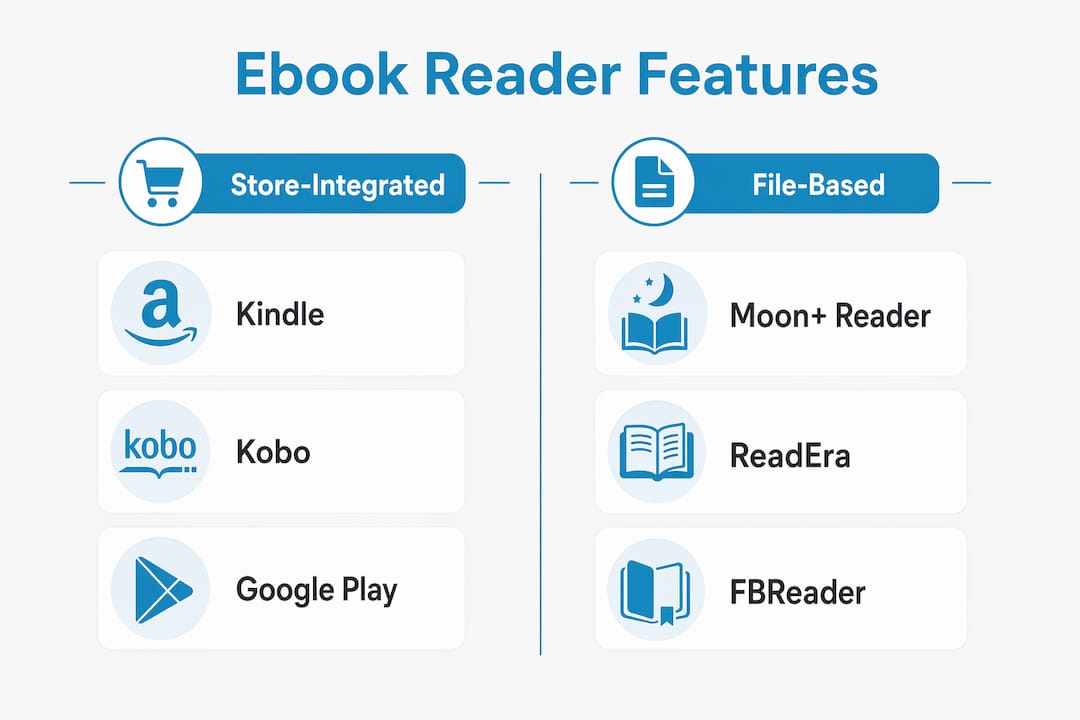
Choosing between these apps comes down to five practical dimensions. Store-integrated apps like Kindle and Kobo trade format flexibility for purchase convenience, while file-focused apps like Moon+ Reader and ReadEra give you full ownership of your library.
| App | Supported file formats | Syncing | Customization | Platform availability | Best use case |
|---|---|---|---|---|---|
| eBook Warehouse Maximise Your Earnings | PDF, multi-device download | Cloud download | Curated titles | iOS, Android, desktop | Broad readers wanting quality curated content |
| Amazon Kindle | PDF, EPUB (via conversion) | Cloud sync, Whispersync | Font, color, spacing | iOS, Android, Windows, Mac, web | Amazon ecosystem readers |
| Google Play Books | EPUB, PDF | Cloud sync across all platforms | Font, themes, brightness | iOS, Android, web | Cross-platform and desktop readers |
| Kobo Books | EPUB, PDF, MOBI, CBZ | Continuous progress sync | Font, Night Mode, text-to-speech | iOS, Android, Kobo e-reader, web | Audiobook and eBook combo readers |
| Moon+ Reader | multiple formats including CBZ, FB2, EPUB, PDF | Cloud storage integration | Themes, tilt-to-turn, granular layout | Android | Personal library and niche format readers |
| ReadEra | EPUB, PDF, MOBI, FB2, DJVU, CBZ | Offline-first, no account needed | Standard display options | Android | Simple, offline-first PDF readers |
Moon+ Reader’s library view mimics music streaming apps, pulling files from Dropbox, local networks, and Project Gutenberg. ReadEra, by contrast, handles PDFs with text reflow and cropping that makes them genuinely readable on small screens.
How to choose the right ebook reader app for you
Your reading habits should drive the decision, not the app’s star rating.
- File compatibility first. If you own DRM-free EPUBs or PDFs, Moon+ Reader or ReadEra handle them better than Kindle or Kobo.
- Sync matters if you switch devices. Google Play Books and Kobo sync smoothly across devices, including web browsers. Independent apps often require a cloud account setup.
- Annotation tools vary widely. Moon+ Reader’s highlighting system supports underline, strikethrough, color coding, and notes. Kindle offers X-Ray and margin notes. ReadEra keeps it minimal.
- Cost model. Most apps are free to download and let you read personal files without a subscription. Store-tied apps earn revenue when you buy titles inside them.
- Accessibility and comfort. Kobo’s text-to-speech and Night Mode suit readers with eye strain. Moon+ Reader’s tilt-to-turn feature works well for hands-free reading in bed.
Pro Tip: Pair any of these apps with Calibre on your desktop to convert formats, manage your full library, and sync directly to your phone. It’s the single best move for readers with large personal collections.
For language learners, apps that support instant word lookup add real value. A tool like Word By Word integrates translation and dictionary features that complement in-app lookups.
Which apps handle annotation and note-taking best?
Moon+ Reader leads here. You highlight any passage and get options to underline, strikethrough, color-code, or attach a note. It’s built for dense books that need cross-referencing. The Kindle app offers annotation and bookmarking with its X-Ray feature, which surfaces character details and key terms across the whole book. Google Play Books and Kobo both sync highlights and notes across devices, so nothing gets lost when you switch from phone to tablet.

How well do these apps work offline?
ReadEra is the strongest offline option. It needs no account, stores everything locally, and works without any internet connection. Moon+ Reader also reads local files without logging in. Kindle, Google Play Books, and Kobo all support offline reading after you download titles, but they require account sign-in and periodic syncing to stay current. If you travel frequently or have unreliable internet, ReadEra or Moon+ Reader are the practical choices.
What about security and privacy?
Store-integrated apps collect purchase history, reading behavior, and device data to power recommendations. Kindle and Kobo are transparent about this in their privacy policies, but it’s a real trade-off. ReadEra and Moon+ Reader, being file-focused and account-optional, collect far less. ReadEra in particular requires no login at all, which limits data exposure. If privacy is a priority, independent reader apps give you more control over what you share.
Ebook-warehouse gives you quality content ready for any app
Every app on this list is only as good as what you read on it. Ebook-warehouse offers a curated catalog of downloadable PDFs across personal development, business, health, cooking, and more, all formatted for instant multi-device access.
Whether you pick up a title like Maximise Your Earnings or browse niche subjects you won’t find on mainstream store shelves, every purchase downloads directly to your device. No subscription, no lock-in. Browse the full Ebook-warehouse catalog and find your next read today.
Key Takeaways
The best ebook reader apps balance format support, sync reliability, and customization to match how you actually read.
| Point | Details |
|---|---|
| App type shapes your experience | Store-tied apps offer purchase convenience; file-focused apps give you format freedom and ownership. |
| Sync quality varies widely | Google Play Books and Kobo sync across web, mobile, and tablet; ReadEra works fully offline with no account. |
| Annotation depth differs | Moon+ Reader offers the most granular highlighting; Kindle adds X-Ray for character and term lookup. |
| Privacy trade-offs exist | Account-free apps like ReadEra collect minimal data compared to store-integrated platforms. |
| Ebook-warehouse fits any app | Ebook-warehouse titles download as PDFs, ready to open in whichever reader you choose. |