

PDF vs EPUB: The 2026 Format Guide for Readers
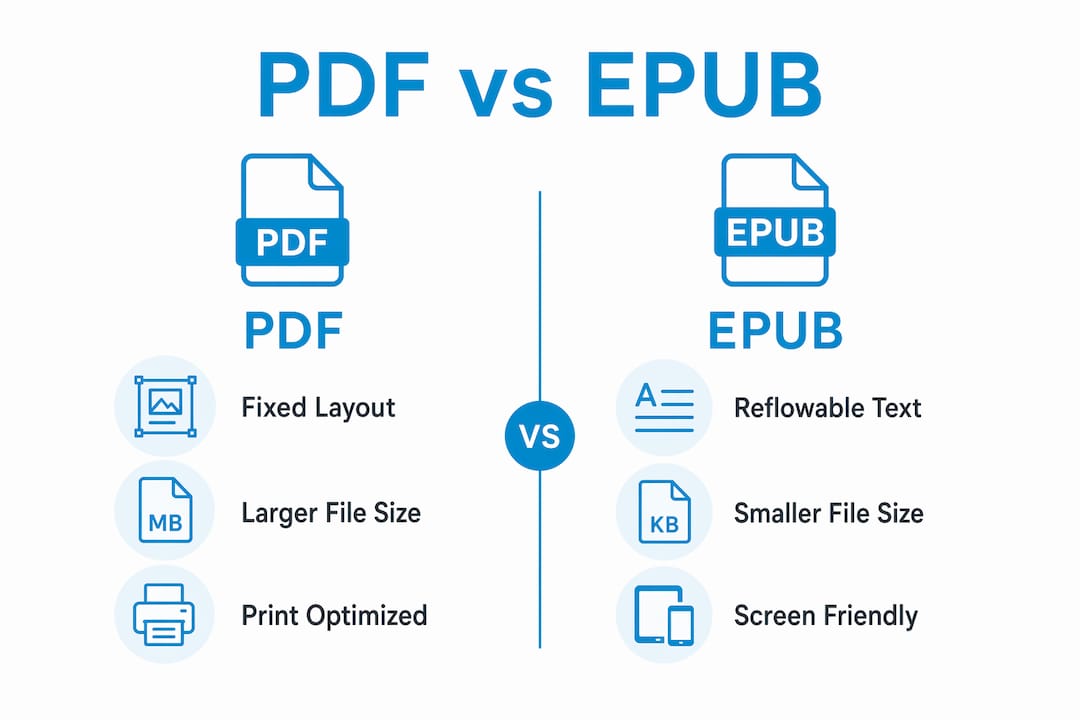
PDF (Portable Document Format) preserves exact page layouts for print-accurate documents, while EPUB (Electronic Publication) delivers reflowable text that adapts to any screen size. Understanding the pdf vs epub difference is the single most important decision you will make when choosing, buying, or publishing a digital book. The wrong format creates a frustrating reading experience. The right one feels invisible. This guide covers the technical distinctions, reading experience, best use cases, and conversion challenges so you can choose with confidence in 2026.
What are the technical differences between PDF and EPUB?
PDF and EPUB are built on completely different architectures. PDF locks every element to exact (x, y) coordinates on a fixed canvas. A heading, image, or paragraph sits at a precise position on a virtual page, regardless of the screen displaying it. That is why a PDF looks identical whether you open it on a desktop monitor or a phone. The tradeoff is rigidity.
EPUB works the opposite way. An EPUB file is a zipped archive containing HTML, CSS, images, and metadata. The text flows like a webpage, wrapping and resizing based on the reader’s screen and preferences. This is the same technology behind every website you visit. That web-based foundation is why EPUB adapts so naturally to phones, tablets, and e-readers.

File size is another major difference. EPUB files run 5–20x smaller than comparable PDFs. PDF stores every glyph at a fixed position, which inflates file size. EPUB stores structured content and lets the reading app handle rendering. Smaller files mean faster downloads and less storage use on your device.
EPUB also has two major versions worth knowing. EPUB 2 is the older standard with basic HTML support. EPUB 3, the current standard, adds audio, video, MathML for equations, and richer accessibility features. Fixed-layout EPUB is a hybrid format that uses HTML/CSS absolute positioning to replicate PDF-style page fidelity while keeping text selectable and accessible. It is the best of both worlds for illustrated children’s books or design-heavy titles.
Pro Tip: If you are publishing a text-heavy novel or nonfiction book, always choose EPUB 3. It gives readers font control, dark mode, and accessibility features that PDF simply cannot match.
| Feature | EPUB | |
|---|---|---|
| Layout type | Fixed, coordinate-based | Reflowable, HTML/CSS-based |
| File size | Larger | 5–20x smaller |
| Font customization | Limited | Full reader control |
| Accessibility | Requires manual tagging | Built-in semantic structure |
| Best for | Print documents, forms | Digital books, long-form reading |
How do PDF and EPUB compare for reading experience?
Reading experience is where the epub vs pdf gap becomes most obvious. EPUB was designed for screens. PDF was designed for printers. That single fact explains almost every usability difference between them.
EPUB gives readers direct control over their experience. You can increase font size, switch to a dyslexia-friendly typeface like OpenDyslexic, enable dark mode, or adjust line spacing. These are not workarounds. They are built-in features of the EPUB standard. Screen reader software also works naturally with EPUB because its semantic HTML structure tells assistive technology exactly what each element is: a heading, a paragraph, a list item.
PDF accessibility is a different story. A PDF must be manually tagged to work with screen readers. Many PDFs in circulation have no tags at all. Even a well-tagged PDF requires zooming and horizontal scrolling on a phone screen, which breaks reading flow. For long-form reading on any device smaller than a laptop, PDF creates friction.
The device support picture shifted significantly in 2026. Kindle devices now support DRM-free EPUB files, which means the world’s most popular e-reader ecosystem finally accepts the open standard. That change accelerates EPUB’s position as the dominant format for digital reading. Readers no longer need to convert files before sideloading onto their Kindle.
Key EPUB reading advantages include:
- Font control: Readers choose size, typeface, and weight without affecting other readers’ copies.
- Dark mode: Native support in all major reading apps reduces eye strain.
- Text-to-speech: EPUB 3’s semantic structure enables accurate, natural-sounding TTS playback.
- Pagination: Reading apps calculate page numbers dynamically based on font size.
- Accessibility: Built-in support for screen readers, high contrast, and dyslexia fonts.
EPUB is preferred in 95% of long-form reading scenarios over PDF. That figure reflects how poorly fixed layouts serve mobile and e-reader screens. PDF remains the right tool for specific jobs, but those jobs rarely involve sitting down to read a book.
Pro Tip: When buying digital books for reading on a phone or tablet, always choose EPUB when available. You will get a better experience on every device you own, now and in the future.
Which format works best for different types of content?
Choosing between formats comes down to what the document needs to do. PDF is the correct choice when strict page fidelity matters. Legal contracts must look identical for every signatory. Academic papers with complex footnotes and citations need fixed positioning. Sheet music cannot reflow. Tax forms, government documents, and layout-heavy workbooks all depend on pixel-perfect reproduction. PDF delivers that without compromise.
EPUB is the correct choice when the reader’s comfort matters more than the author’s layout. Novels, narrative nonfiction, self-help books, and most textbooks work better as EPUBs. The reader controls the experience, and the text adapts to their device. Ebook-warehouse publishes titles across personal development, business, and cooking, and EPUB is the format that serves those readers best across phones, tablets, and dedicated e-readers. You can explore affordable digital books in multiple formats directly through Ebook-warehouse.
Here is a practical breakdown of which format fits which content type:
- Legal and official documents: Use PDF. Layout integrity is non-negotiable, and recipients expect a PDF.
- Novels and narrative nonfiction: Use EPUB. Reflowable text and font control make long reading sessions comfortable.
- Illustrated children’s books: Use fixed-layout EPUB or PDF. Both preserve image placement, but fixed-layout EPUB keeps text accessible.
- Academic papers and research: Use PDF. Footnotes, citations, and figures need precise positioning.
- Self-help and business books: Use EPUB. Readers consume these on phones and tablets where reflow is critical.
- Cookbooks with heavy photography: Use fixed-layout EPUB or PDF. Image-dominant pages need positional control.
- Textbooks with equations: Use EPUB 3 with MathML. It renders math correctly and stays accessible.
Publishing professionals commonly deliver both formats to meet different reader expectations. A business book might ship as an EPUB for retail distribution and a PDF for corporate training programs. That dual-format approach is not redundant. It is the standard practice for reaching the widest possible audience without compromising quality in either direction. If you are building a publishing workflow, the POD business guide from Ebook-warehouse covers how to structure multi-format production efficiently.
What are the challenges of converting between PDF and EPUB?
Format conversion sounds simple. It rarely is. The direction of conversion determines how difficult the process will be.
Converting PDF to EPUB is genuinely difficult. PDF stores fixed glyph positions, not structured content. Automated conversion tools read those positions and try to reconstruct reading order, headings, and paragraphs. They frequently get it wrong. Multi-column layouts collapse into single garbled streams. Footnotes appear mid-paragraph. Images land in the wrong place. The result requires extensive manual cleanup before it reads cleanly.
Converting EPUB to PDF is the opposite. It is essentially a rendering process. The reading app or conversion tool renders each HTML page to a fixed canvas and exports it as a PDF. The output is predictable and usually clean. You lose reflowability, but the visual result is reliable.
Common problems to watch for during conversion:
- Broken reading order: Automated tools misread column layouts and insert text in the wrong sequence.
- Lost headings: PDF headings are often styled text, not semantic tags, so converters cannot identify them.
- Formatting errors: Tables, lists, and special characters frequently break during PDF-to-EPUB conversion.
- Image placement issues: Images anchored to fixed positions in PDF do not translate to EPUB’s flow model.
- Font substitution: Embedded fonts in PDF may not carry over, changing the visual character of the text.
The cleanest solution is to prepare source documents for both formats separately from the start. A well-structured Word document or InDesign file can export to both PDF and EPUB with far less cleanup than converting one finished format to the other. Always test the output on actual devices, not just in desktop preview software. A conversion that looks correct on a laptop may break completely on a small phone screen.
Key Takeaways
EPUB is the superior format for digital reading, while PDF remains the standard for print-accurate documents requiring fixed layouts.
| Point | Details |
|---|---|
| Format architecture | PDF uses fixed coordinates; EPUB uses reflowable HTML/CSS that adapts to any screen. |
| File size | EPUB files are 5–20x smaller than PDFs, making them faster to download and store. |
| Reading experience | EPUB supports font control, dark mode, and screen readers by design; PDF requires manual accessibility work. |
| Best use cases | Use PDF for legal, academic, and print documents; use EPUB for novels, self-help, and long-form reading. |
| Conversion direction | EPUB to PDF is straightforward rendering; PDF to EPUB requires significant manual restructuring. |
The format debate misses the real question
Most readers frame this as a competition. PDF versus EPUB, one winner, one loser. That framing is wrong, and I have seen it lead to genuinely bad publishing decisions.
The formats are not rivals. They solve different problems. PDF is a delivery mechanism for documents that must look identical everywhere. EPUB is a reading experience designed to disappear. When a format does its job well, you stop noticing it. You just read.
What I find more interesting is how device ecosystems are finally catching up to what the EPUB standard has offered for years. Kindle’s 2026 support for DRM-free EPUBs is not a small update. It signals that the walled-garden era of proprietary reading formats is ending. Readers will increasingly expect EPUB as the default, not a niche alternative.
For content creators, the practical advice is this: write once, publish twice. Build your source document with clean semantic structure. Export to EPUB for retail and digital distribution. Export to PDF for print, official use, and professional contexts. The overhead is lower than most people expect, and the audience reach is significantly wider.
Accessibility is the argument that should end the debate for anyone publishing books. EPUB’s semantic HTML gives screen readers, text-to-speech engines, and dyslexia tools everything they need to work correctly. PDF accessibility requires deliberate, manual effort that most publishers skip. If your content is meant to be read by people, EPUB is the format that respects that.
— Stephen
What Ebook-warehouse offers for digital readers
Choosing the right format matters most when the content itself is worth reading. Ebook-warehouse curates a collection of downloadable eBooks across personal development, business, cooking, and online education, all designed for convenient reading across multiple devices.
Whether you are looking to build financial knowledge with Maximise Your Earnings or sharpen your business thinking, Ebook-warehouse delivers titles in formats optimized for the way you actually read. Every purchase gives you instant access across your devices, so you get the reading experience EPUB was built to provide. Browse the full collection at Ebook-warehouse and find your next read today.
FAQ
What is the main difference between PDF and EPUB?
PDF locks content to a fixed page layout optimized for print, while EPUB uses reflowable HTML/CSS that adapts to any screen size and reader preferences.
Which is better for reading on a phone or tablet?
EPUB is better for reading on phones and tablets because it reflows text to fit the screen and supports font size control, dark mode, and accessibility features.
Can Kindle read EPUB files?
As of january 2026, Kindle devices support DRM-free EPUB files, making it possible to sideload EPUB books directly without format conversion.
Is it hard to convert PDF to EPUB?
PDF to EPUB conversion is difficult because PDF stores fixed glyph positions rather than structured content, requiring extensive manual cleanup after automated conversion.
Should publishers offer both PDF and EPUB?
Yes. Publishing professionals commonly deliver both formats to meet different reader and distribution needs, with EPUB for digital retail and PDF for print or official document contexts.