

5 Quick PDF Ebook Safety Checks Every Reader Can Do
PDF ebooks are safe when they come from a reputable seller or public-domain archive and dangerous when they don’t. The file format itself can carry malicious JavaScript, launch actions, and malformed objects, and unofficial “free-for-all” download sites are the most common source of infected files, according to Norton’s malware research. Scan anything from an unfamiliar source before opening it, and buy from sellers like Ebook-warehouse when you want a clean, legal copy without the guesswork.
TL;DR:
- PDFs from unofficial sources are a common vector for malware through embedded JavaScript, malicious attachments, and corrupted objects.
- Checking file extensions, sender legitimacy, file size discrepancies, and verifying email headers can help identify suspicious PDFs before opening.
- Scanning files with antivirus tools and keeping software up-to-date significantly reduce the risk of infection from malicious PDFs.
- Downloading PDFs from trusted, curated sellers like Ebook-warehouse minimizes legal and security risks associated with free or unverified sources.
- Using protective measures such as sandboxing, disabling JavaScript, and creating separate user accounts helps contain potential malware infections.
Table of Contents
- Are PDF Ebooks Safe? How the File Format Gets Weaponized
- How to Tell if a PDF Ebook Is Safe Before You Open It
- How to Scan and Defend Against Malicious PDFs
- Legal and Copyright Risks of Downloading Free PDF Ebooks
- If You Already Opened a Suspicious PDF: What to Do Now
- Building a Safer Habit Around PDF Ebooks
- Where Ebook-warehouse Fits Into Safer Reading
- What Actually Matters Here, and What Gets Overhyped
- A Safer Way to Buy PDF Ebooks Without the Guesswork
- Sources
Are PDF Ebooks Safe? How the File Format Gets Weaponized
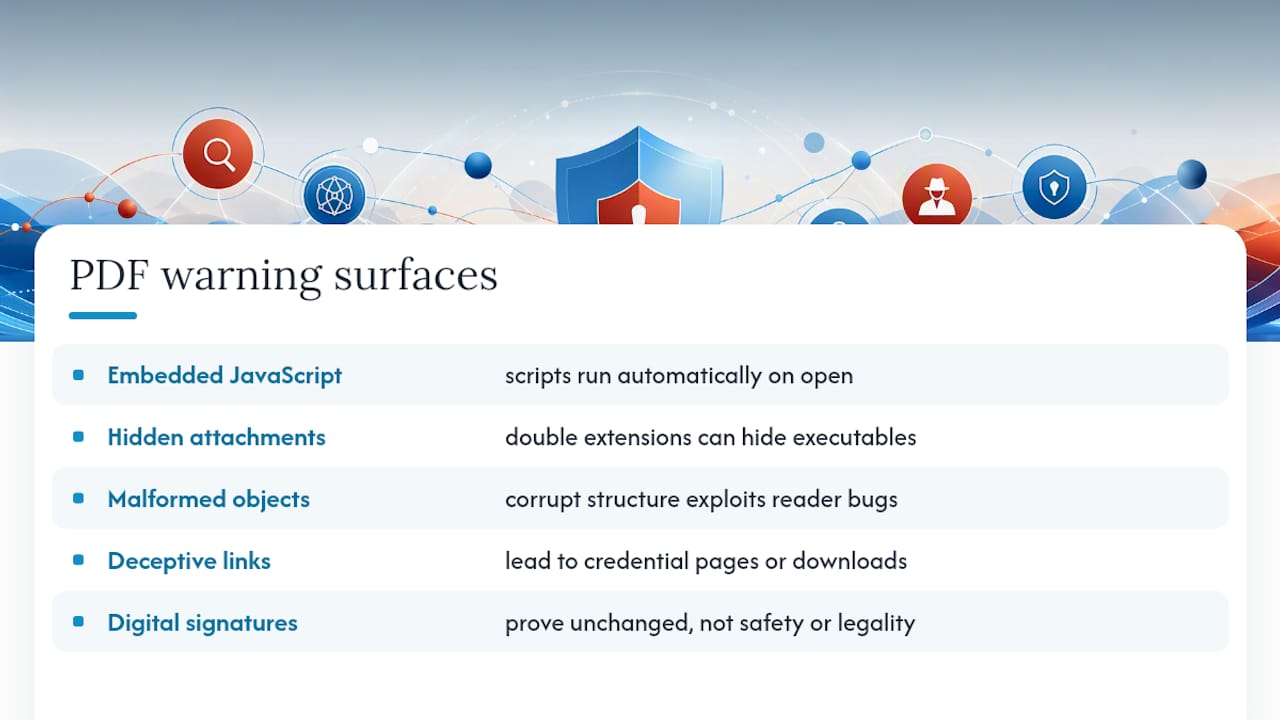
A PDF is not a static page. It’s a container format that can hold JavaScript, embedded files, form fields, and instructions telling a reader application to do something the moment the file opens. That flexibility is exactly what makes some PDFs dangerous.
The most common attack path runs through embedded JavaScript. Adobe’s own security documentation confirms PDFs can carry scripts capable of running automatically, often triggered by an /OpenAction command the moment the file loads. Pair that with a /Launch action, and the PDF can attempt to execute an external program without you clicking anything beyond “open.”
Embedded files are another vector. A PDF can carry a hidden attachment, sometimes disguised with a double extension like invoice.pdf.exe, so the file appears to be a document at a glance but is actually an executable. Malformed objects push this further: attackers deliberately corrupt the PDF’s internal structure to exploit bugs in how a specific reader parses the file, a technique that has shown up repeatedly in targeted phishing campaigns tracked by ESET’s WeLiveSecurity researchers.
Links inside PDFs deserve the same suspicion as links in email. A “click to download the full book” button can route to a credential-harvesting page dressed up as a login screen, or silently trigger a second download that has nothing to do with the ebook you thought you were getting.
One nuance worth knowing: a digital signature on a PDF only proves the file hasn’t changed since it was signed. It says nothing about whether the content was safe or legal in the first place, a distinction SonicWall’s security team flags as a common point of false confidence.
How to Tell if a PDF Ebook Is Safe Before You Open It
You don’t need special software to catch most red flags. A quick look at the file and its source usually tells you enough.
Run through this before opening anything you didn’t request or buy directly:
- Double extensions. A file named “ebook.pdf.exe” or “chapter1.pdf.scr” is not a PDF. Windows sometimes hides the real extension by default, so if the icon looks off, check the full file name.
- Unexpected sender or unsolicited email. A “here’s the ebook you requested” message you never requested is the single biggest tell.
- Compressed attachments. A ZIP or RAR file claiming to hold a PDF is a common wrapper for malware, since compression can dodge basic email scanning.
- Mismatched sender domain. If the email claims to be from a known seller but the sending address doesn’t match their actual domain, treat it as fake.
- Odd file size for the content. A “300-page ebook” that’s 40 KB, or a single page that’s 80 MB, both suggest something other than text is packed inside.
Email provenance checks add another layer. Most webmail clients let you view the full message headers (“Show Original” in Gmail, “View Source” in Outlook), where you can check whether SPF, DKIM, and DMARC all passed. A failed DKIM check on a message claiming to be from a major retailer is a strong signal it’s spoofed.
If something looks slightly off but you’re not sure, verify through a separate channel entirely: call the sender, check their official site directly, or search for the ebook title on a source you already trust, like Ebook-warehouse’s catalog.
Pro Tip: Before opening anything questionable, hover over embedded links (don’t click) to see the actual destination URL, and run suspicious links through a free checker like the ones covered in Scruteon’s link-safety guide before you go anywhere near them.
How to Scan and Defend Against Malicious PDFs
Scanning a file takes less time than reading its first paragraph, and it should be automatic for anything from outside your known sources.
- Right-click and scan. On Windows, right-clicking a downloaded file and selecting “Scan with Microsoft Defender” runs an immediate check using Windows Security’s built-in scanning tool.
- Check the hash on VirusTotal. Uploading a file’s SHA256 hash to VirusTotal reveals whether dozens of antivirus engines have already flagged it, without exposing the file’s contents if you’re worried about privacy.
- Open in Protected View first. Adobe Acrobat and most modern readers open unfamiliar PDFs in a sandboxed mode by default; don’t disable it just to get rid of the warning banner.
- Disable JavaScript in your reader’s settings. Very few legitimate ebooks need it, and turning it off removes an entire attack category in one click, a step Adobe explicitly recommends for exactly this reason.
- Keep your reader and OS updated. Malformed-object exploits typically target specific unpatched versions, so an outdated Acrobat or Preview build is a bigger target than a current one.
On mobile, the sandboxing built into iOS and Android apps generally limits what a malicious PDF can do compared to a desktop machine, but that protection erodes fast if you’re using an obscure reader app instead of the built-in one. Turn off automatic attachment previews in your mail app, and keep your phone’s OS current. Security telemetry on PDF-based attacks tends to focus on desktop environments, largely because mobile sandboxing makes the same tricks less effective there.
Legal and Copyright Risks of Downloading Free PDF Ebooks
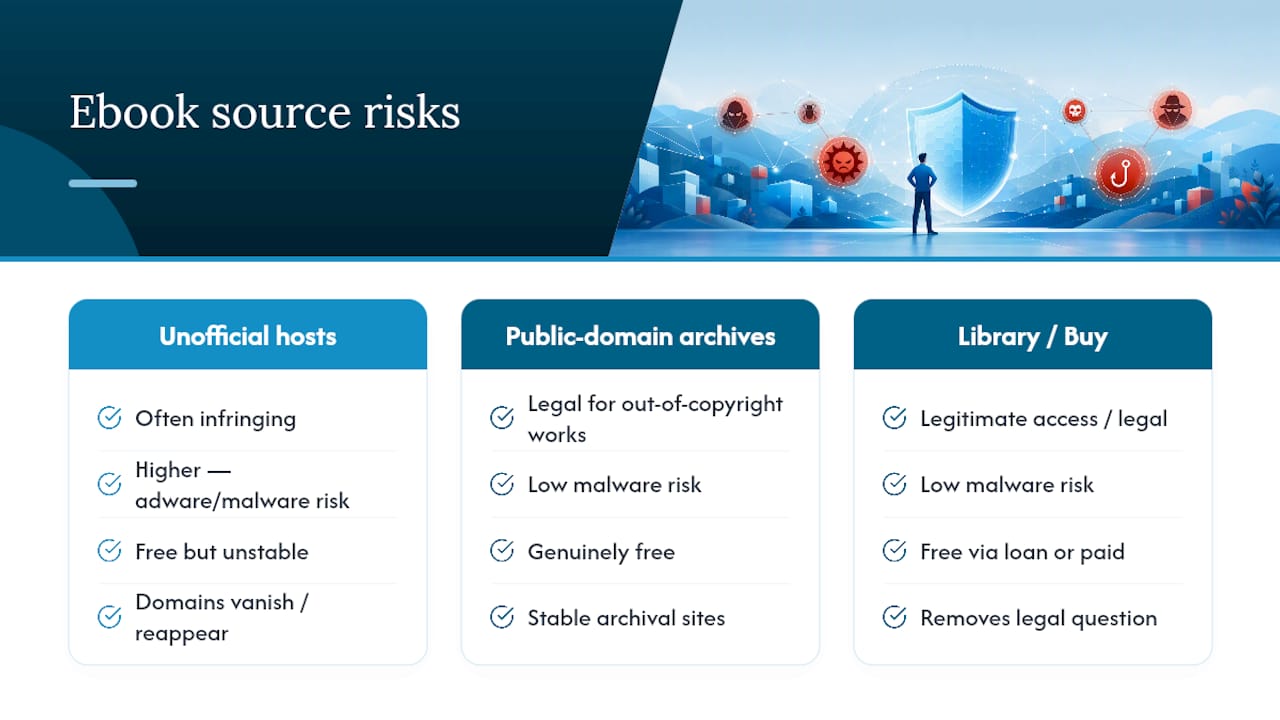
Search “free PDF download” for any bestseller and you’ll get a wall of results mixing legitimate public-domain texts with pirated copies of copyrighted work, often on the exact same site. That mix is not an accident. File-hosting sites that specialize in “free-for-all” ebooks have no incentive to verify what they’re distributing, and Norton’s research on PDF-based threats links these unofficial sources directly to higher rates of adware, malware, and data-harvesting tools bundled into the download.
The legal exposure is real, even for a casual reader. Downloading a copyrighted work without authorization is copyright infringement in most jurisdictions, and while individual readers are rarely the target of lawsuits, the platforms hosting these files face takedowns and account suspensions constantly, which is part of why so many of them vanish and reappear under new domains loaded with fresh malware.
Safer sourcing exists at every price point. Public-domain archives are genuinely free and legal for out-of-copyright works. Library lending platforms give you legitimate access to current titles at no cost. And buying directly from a curated seller removes both the legal question and most of the malware risk in one step.
If You Already Opened a Suspicious PDF: What to Do Now
If you’ve opened a file and something feels wrong, whether it’s a slow computer, a strange pop-up, or a program you don’t recognize running, act in this order:
- Disconnect from the network immediately. Pull the ethernet cable or switch off Wi-Fi to stop the malware from communicating with anything or spreading further.
- Run a full antivirus scan, not a quick scan, using your installed antivirus or Windows Security.
- Check running processes and recent network connections for anything unfamiliar, especially processes you don’t recognize consuming CPU or sending data out.
- Change your passwords from a different, clean device, starting with email and banking, since Kaspersky’s guidance on PDF compromises points to credential theft as a common follow-on goal.
- Update all software on the affected device and consider a fraud alert on financial accounts if anything sensitive may have been exposed.
If this happened on a work device, or the symptoms persist after a scan, stop troubleshooting yourself and report it to IT or a security professional right away. Some malware is built specifically to survive a surface-level cleanup.
Building a Safer Habit Around PDF Ebooks
The readers who never run into trouble with PDF ebooks tend to follow the same quiet routine, not because they’re security experts, but because the habit costs them almost nothing.
- Buy from sellers with a real storefront and support contact, or stick to well-known public-domain archives, and skip anonymous “free ebook” search engines entirely.
- Store your library in an encrypted cloud folder or an encrypted local drive, and back it up somewhere separate.
- Leave Protected View and sandboxing turned on in your reader, keep JavaScript disabled, and block external content from loading automatically.
- Use a password manager and two-factor authentication on the accounts tied to your ebook purchases, since that’s the credential trail an attacker would target first.
- Compare formats before you commit if you’re choosing between a PDF and EPUB version of the same title, since reader behavior differs slightly between the two.
Pro Tip: Keep a separate, low-privilege user account on your computer just for opening files from sources you’re not fully sure about. If something malicious does slip through, it’s contained to an account with no access to your main files or saved passwords.
Where Ebook-warehouse Fits Into Safer Reading
Ebook-warehouse curates its PDF catalog rather than aggregating whatever shows up online, covering personal development, business, cooking, and other niche subjects with titles vetted before they’re listed. That curation is the practical opposite of a “free-for-all” download site: every purchase is a known, legal file delivered directly, not scraped from a mirror site of uncertain origin.
For readers who want a deeper look at sourcing ebooks the right way, Ebook-warehouse’s guide on downloading PDF ebooks legally and its roundup of research-backed learning titles are good next stops.
This piece was written by Stephen, drawing on published vendor security guidance and security-research telemetry rather than firsthand lab testing.
What Actually Matters Here, and What Gets Overhyped
Most advice on PDF safety spends too much time on exotic exploits and not enough on the boring habit that actually prevents nearly all of the trouble: source discipline. Readers fixate on whether their antivirus can catch a zero-day malformed-object attack, when the real fix is simpler. Don’t download from sites you can’t verify, and most of this risk disappears before you ever need a scanner.
The conventional advice also tends to treat “scan the file” as the finish line. It isn’t. A clean VirusTotal result tells you known antivirus engines haven’t flagged the file yet, not that it’s guaranteed safe, and it says nothing about whether you’re now holding a pirated copy with its own legal exposure. Security and legality are two separate questions that most guides collapse into one.
If I had to rank priorities for a typical reader, source comes first, reader settings (JavaScript off, Protected View on) come second, and scanning tools come a distant third, useful, but only as a backstop for mistakes you’ve already mostly avoided by choosing where you download from in the first place.
— Stephen
A Safer Way to Buy PDF Ebooks Without the Guesswork
Buying from a curated seller sidesteps both problems this article covers at once: you’re not gambling on whether a file is clean, and you’re not gambling on whether you’re allowed to have it. Ebook-warehouse handles both by selling licensed, direct-download PDFs across categories like personal development, business, and cooking, with each purchase readable across your devices right after checkout.
If you’re looking for a practical place to start, the Personal Productivity collection is a solid entry point for readers tired of hunting through sketchy download sites for basic self-improvement titles. It’s the same content people search “free PDF download” for, minus the malware risk and the copyright question mark. Check out the Personal Productivity ebooks now and get your copy instantly.
Sources
- Can a PDF have a virus? Yes, here’s how to protect yourself — Norton
- Can PDFs contain viruses? Keep your files safe — Adobe Acrobat
- Beware of threats lurking in booby-trapped PDF files — WeLiveSecurity (ESET)