

Best Scribd Alternatives for U.S. Readers in 2026
The strongest Scribd alternatives for U.S. readers right now are Amazon Kindle Unlimited, Libby (powered by OverDrive), Project Gutenberg, and Ebook-warehouse. For most readers who want predictable access without subscription throttles, Ebook-warehouse is the recommended ownership-first pick: you buy a PDF once, download it immediately, and read it on any device without worrying about monthly unlock limits.
Quick picks by need:
- Best for audiobooks: Audible (pay-per-title) or Amazon Kindle Unlimited (bundled with Kindle Unlimited membership)
- Best free public-domain books: Project Gutenberg (70,000+ titles, no account required)
- Best for borrowing through your local library: Libby / OverDrive (free with a library card)
- Best for documents and presentations: SlideShare (25M+ presentations) or Issuu (PDF-to-flipbook conversion)
- Best for buy-to-own downloadable PDFs: Ebook-warehouse
One thing worth clarifying before you dive in: Scribd has split into two products. The reading subscription (books, audiobooks, magazines) now lives under the Everand brand, while the Scribd domain continues as a document repository. When most people say “Scribd alternatives,” they mean alternatives to the reading subscription, which is Everand. This article covers both use cases.
Key Takeaways
The clearest path through the Scribd alternatives market is matching your reading behavior to the right model: subscription for volume fiction, library apps for free casual reading, and buy-to-own for titles you want to keep.
| Point | Details |
|---|---|
| Scribd is now two products | Everand handles books and audiobooks; Scribd remains a document repository. Know which one you’re replacing. |
| Subscription throttles are real | Everand caps premium title access for heavy readers each month; factor this in before committing. |
| Free options cover most casual needs | Libby, Hoopla, and Project Gutenberg cost nothing and cover most casual reading with a library card or no account at all. |
| Catalog fit beats headline size | Kindle Unlimited’s roughly 4 million titles vs. Everand’s roughly 1 million matters less than whether your preferred genres are actually covered. |
| Ebook-warehouse suits ownership-first readers | Buy a PDF once, keep it permanently, and read it on any device without monthly fees or access limits. |
Table of Contents
- How do the top Scribd alternatives compare side by side?
- How do you pick the right Scribd alternative for your reading habits?
- What does each top alternative actually offer you?
- Why Ebook-warehouse works well as a Scribd alternative
- The case for ownership over subscriptions
- Ebook-warehouse: downloadable PDFs without the subscription headaches
- Useful sources and official links
How do the top Scribd alternatives compare side by side?
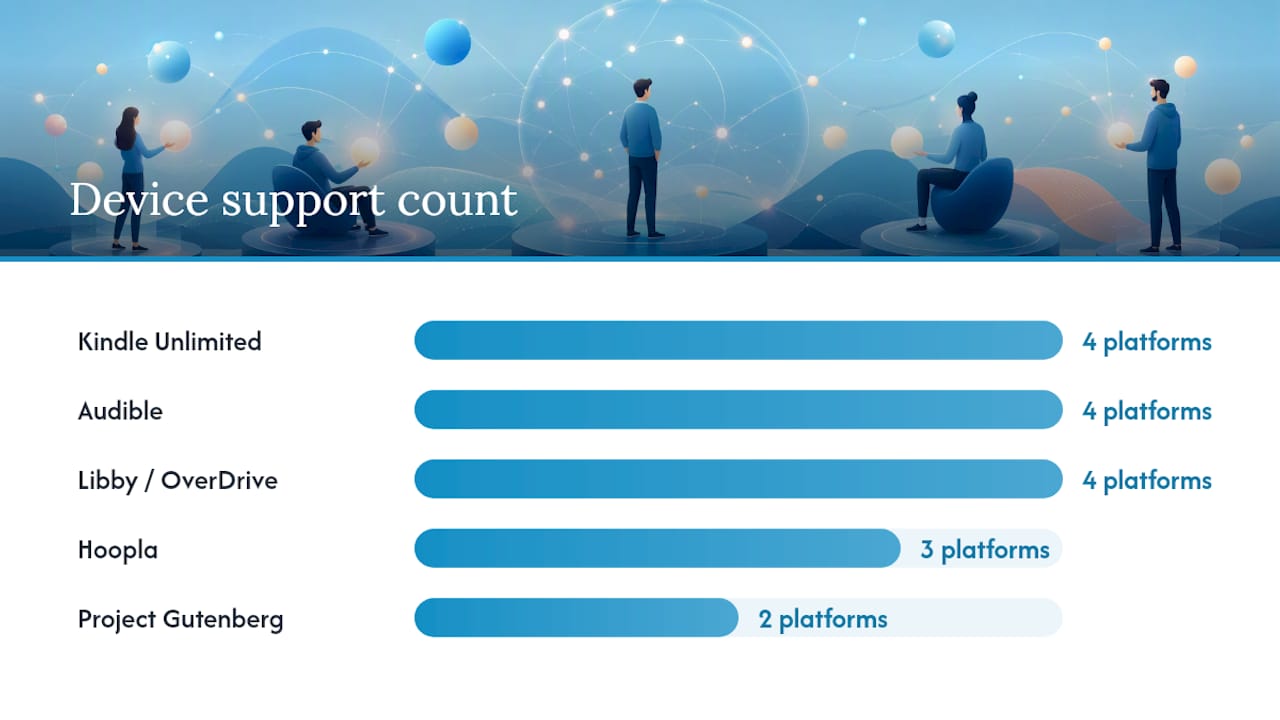
| Service | Pricing model | Content types | Best for | Download / offline | Device support | US availability / free trial |
|---|---|---|---|---|---|---|
| Amazon Kindle Unlimited | $11.99/mo subscription | eBooks, audiobooks (select), magazines | Indie and self-published fiction | Licensed downloads, no ownership | iOS, Android, Kindle, web | Yes / 30-day free trial |
| Audible | $14.95/mo or à la carte | Audiobooks, podcasts, originals | Dedicated audiobook listeners | Owned credits (keep after cancel) | iOS, Android, Alexa, web | Yes / 30-day free trial |
| Libby / OverDrive | Free with library card | eBooks, audiobooks, magazines | Budget readers with a library card | Licensed, expires at loan end | iOS, Android, Kindle, web | Yes / no cost |
| Hoopla | Free with library card | eBooks, audiobooks, comics, films | Instant borrows (no waitlists) | Licensed, expires at loan end | iOS, Android, web | Yes / no cost |
| Project Gutenberg | Free | Public-domain eBooks | Classic literature, research | Full download, DRM-free | Web, any e-reader | Yes / no account needed |
| Internet Archive | Free (some limits) | Books, audio, video, web archives | Research, rare texts, scanning | Controlled digital lending | Web, iOS, Android | Yes / free account |
| Google Play Books | Pay-per-title | eBooks, audiobooks | Flexible buyers, no subscription | Owned download | iOS, Android, web | Yes / no subscription required |
| SlideShare | Free (basic) | Presentations, documents (25M+ presentations, 70M+ active users) | Research, slide decks | Limited download | Web, iOS, Android | Yes / free tier |
| Issuu | Free / paid tiers | PDFs, magazines, flipbooks (PDF-to-flipbook conversion, supports PDF, DOCX, PPTX, EPUB) | Magazine-style and PDF publishing | Paid tier required for download | Web, iOS, Android | Yes / free tier |
Free and public-domain picks: Project Gutenberg and Internet Archive are the cleanest no-cost routes. No subscription, no account required for Gutenberg, and no DRM on the files you download.
Library apps and how to use them: Libby and Hoopla both require a valid U.S. library card. Libby pulls from your library’s licensed catalog (popular titles, but sometimes waitlists). Hoopla gives you instant borrows with a monthly cap set by your library. Check your library’s website to see which service it supports.
Note on throttling: Long-form testing of Everand shows the service effectively caps access to premium titles after heavy use in a given month. If you read more than a few titles a month, that limit hits faster than most users expect.
How do you pick the right Scribd alternative for your reading habits?
Start with your primary goal. Everything else follows from that one answer.
- You want to own what you read: Skip subscriptions entirely. Buy-to-own options like Ebook-warehouse or Google Play Books give you a file that stays yours. Understanding PDF vs. EPUB trade-offs helps here, since format affects how well a book displays on different devices.
- You read mostly audiobooks: Audible’s credit model means you keep titles even after canceling. Kindle Unlimited includes some audio, but the selection is narrower than Audible’s full catalog.
- You read casually and have a library card: Libby costs nothing. For most light readers, it covers everything they need.
- You need research documents, slide decks, or white papers: SlideShare and Issuu are purpose-built for that. Neither is a book-reading app.
- You’re price-sensitive and read classics: Project Gutenberg has no fees, no ads, and no account. It’s the cleanest free option available.
Questions to ask before committing to a service:
- Does the catalog actually cover the genres or topics I read? Headline title counts can mislead: Kindle Unlimited claims roughly 4 million titles versus Everand’s roughly 1 million, but genre composition matters more than raw numbers.
- Is there a throttle or monthly unlock limit on premium titles?
- Can I read offline, and do I own the file after downloading?
- Does it work on my device (Kindle e-ink, Android tablet, iPhone)?
- Are there region restrictions that could cut off access later?
Red flags to watch for: hidden unlock limits after a few premium titles per month, rotating catalogs that remove titles mid-read, DRM that prevents sideloading to an e-reader, and geographic restrictions that activate without warning.
Pro Tip: When two services cost the same monthly amount, run both free trials simultaneously and track what you actually finish. Catalog fit decides value far more reliably than any feature comparison.
What does each top alternative actually offer you?
Amazon Kindle Unlimited
Kindle Unlimited runs $11.99 per month and gives you access to a large catalog weighted heavily toward indie and self-published titles. You can borrow up to 10 titles at once, and the files download to any Kindle device or the free Kindle app on iOS and Android. The catch: you don’t own anything. Cancel the subscription and the library disappears. It works well for readers who burn through genre fiction quickly, less so for nonfiction readers who want to keep a reference book permanently.
At a glance:
- Roughly 4 million titles, indie-heavy
- 10 simultaneous borrows
- 30-day free trial available
Audible
Audible charges $14.95 per month for one credit, which you redeem for any audiobook regardless of price. Credits carry over and stay yours even if you cancel. The app works on iOS, Android, Alexa devices, and the web. For anyone who commutes or exercises while listening, Audible’s catalog depth and offline playback are hard to beat. The per-credit model also means you’re never locked into a rotating catalog.
At a glance:
- Largest audiobook catalog in the US
- Credits are permanent (survive cancellation)
- Whispersync lets you switch between reading and listening
Libby / OverDrive
Free with any U.S. public library card. Libby is the app; OverDrive is the backend that powers it. Your library’s licensed catalog determines what’s available, and popular new releases often have waitlists. The upside: no cost, no credit card, and the app is genuinely well-designed. Kindle users can send borrowed books directly to their device. If your library participates, this is the most cost-effective option for casual readers.
At a glance:
- Free (library card required)
- Waitlists on popular titles
- Works on iOS, Android, Kindle, and web
Hoopla
Also free with a library card, but Hoopla works differently from Libby. There are no waitlists; you borrow instantly up to a monthly limit your library sets (often 10–15 borrows). The catalog includes comics, films, and music alongside ebooks and audiobooks. Coverage of bestsellers is thinner than Libby’s, but for readers who hate waiting, Hoopla’s instant-access model is genuinely useful.
Project Gutenberg
Project Gutenberg hosts over 70,000 public-domain titles, all free, all DRM-free, and downloadable in multiple formats including EPUB and plain text. No account required. The catalog is entirely pre-1928 works (US copyright threshold), so it’s best for classic literature, historical texts, and academic research. The interface is basic, but the files are clean and load on any e-reader.
Pro Tip: Project Gutenberg’s Standard Ebooks project produces professionally typeset versions of the same public-domain texts. Worth bookmarking alongside Gutenberg if formatting matters to you.
Internet Archive
The Internet Archive’s Open Library section offers controlled digital lending for millions of scanned books, plus a massive archive of audio, video, and web history. Access to newer titles has faced legal challenges, so treat it primarily as a research tool for older and out-of-print works. Free account required for borrowing; no account needed to browse.
Google Play Books
Google Play Books is a pay-per-title store with no subscription required. You buy a book, you own it, and it syncs across Android, iOS, and the web via your Google account. Pricing is comparable to other retail stores. No throttles, no rotating catalog, no monthly fee. It’s a clean option for readers who want ownership without committing to a single ecosystem.
SlideShare and Issuu
These two serve a different use case entirely: documents, presentations, and magazine-style content rather than books. SlideShare hosts millions of presentations and is the go-to platform for slide decks, white papers, and professional content. Issuu converts PDFs into interactive flipbooks and supports formats including PDF, DOCX, PPTX, and EPUB. Both have free tiers; downloads typically require a paid plan. For readers who need reliable PDF hosting and sharing, specialist tools like Smallpdf, DocDroid, and Yumpu are also worth checking.
Why Ebook-warehouse works well as a Scribd alternative
Ebook-warehouse is the right pick for readers who want to buy a title once, download it as a PDF, and read it on any device without subscription fees or access limits.
The catalog focuses on practical niche topics: personal development, business, health and wellness, cooking, content creation, spirituality, and social media. These are categories where readers often want to keep a book long-term as a reference, not borrow it for a month and return it. That’s a meaningful difference from subscription models.
What Ebook-warehouse offers:
- Downloadable PDFs with instant access after purchase
- Multi-device reading (any device that opens a PDF)
- Curated collections in personal productivity, cooking, business, and wellness
- Occasional bundle promotions (buy-three-get-one-free)
- No monthly fee, no throttle, no rotating catalog
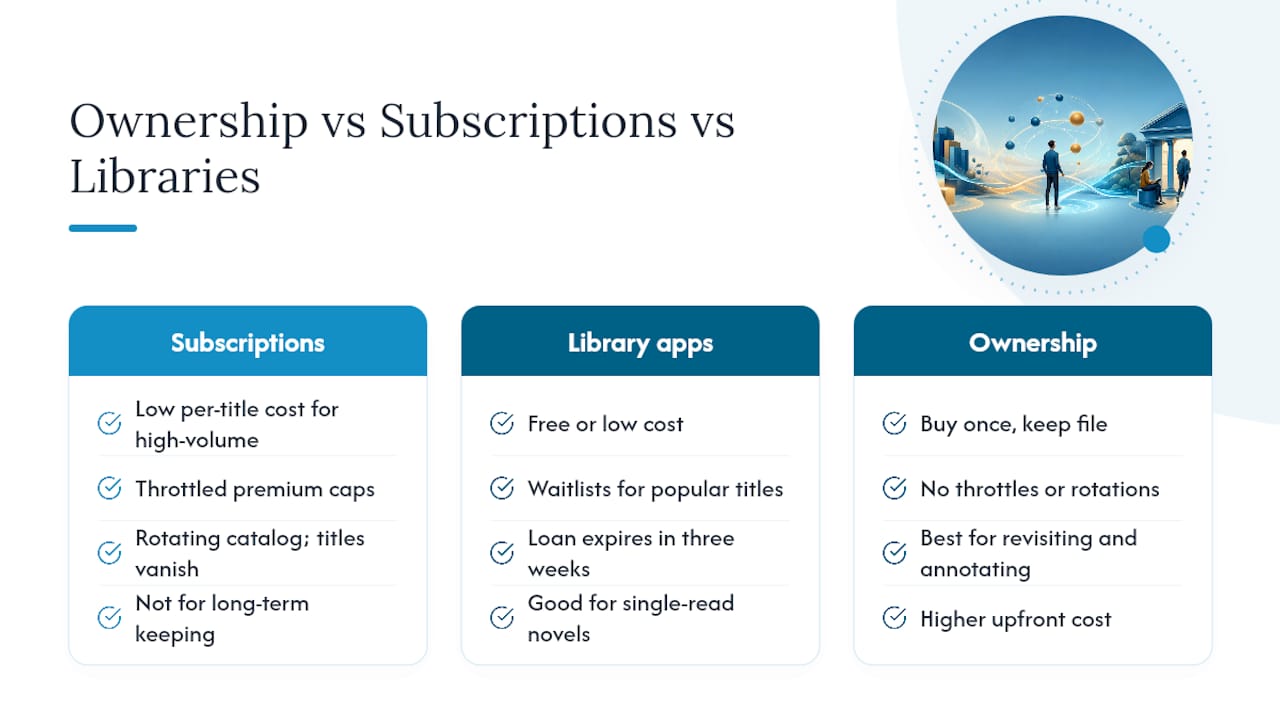
| Model | Ownership | Monthly cost | Catalog type | Offline access |
|---|---|---|---|---|
| Subscription (e.g., Kindle Unlimited) | No | $11.99+ | Large, rotating | Licensed only |
| Library app (Libby, Hoopla) | No | Free | Library-licensed | Expires at loan end |
| Buy-to-own store (Ebook-warehouse) | Yes | Pay per title | Curated niche | Permanent download |
Pro Tip: Choose a buy-to-own store when you’re buying a reference book you’ll return to repeatedly, like a business guide or a cookbook. Subscriptions make more sense for fiction you’ll read once and move on from.
For readers comparing ownership-first alternatives to subscription services, the buy-to-own model removes the single biggest frustration: losing access to a book you were mid-way through because a catalog rotated or a subscription lapsed.
The case for ownership over subscriptions
The conventional wisdom says subscriptions win on value because you get more titles per dollar. That math holds if you read a lot of fiction quickly and don’t care about keeping what you read. For a large portion of former Scribd users, that’s not the situation.
Scribd’s throttling model was a genuine problem. Readers who hit the premium title cap mid-month either paid more or stopped reading. Everand carries the same structural issue. Rotating catalogs add another layer of friction: a title you saved for later can disappear before you get to it.
Library apps solve the cost problem but introduce waitlists and loan expiration. For a novel you’ll read once, that’s fine. For a business book or a cookbook you want to annotate and revisit, a loan that expires in three weeks is the wrong tool.
Ownership-first options, whether Google Play Books for mainstream titles or Ebook-warehouse for curated niche PDFs, remove both problems. You pay once, you keep the file. Subscriptions still make sense for readers who consume high volumes of genre fiction and don’t need to revisit titles. But for anyone building a practical reading library in personal development, business, or wellness, buying to own is the more rational long-term choice.
Ebook-warehouse: downloadable PDFs without the subscription headaches
Subscription services give you volume. Ebook-warehouse gives you permanence. If you’ve been frustrated by Scribd’s throttling, Everand’s rotating catalog, or Libby’s waitlists, the fix is straightforward: buy the titles you actually want and keep them.
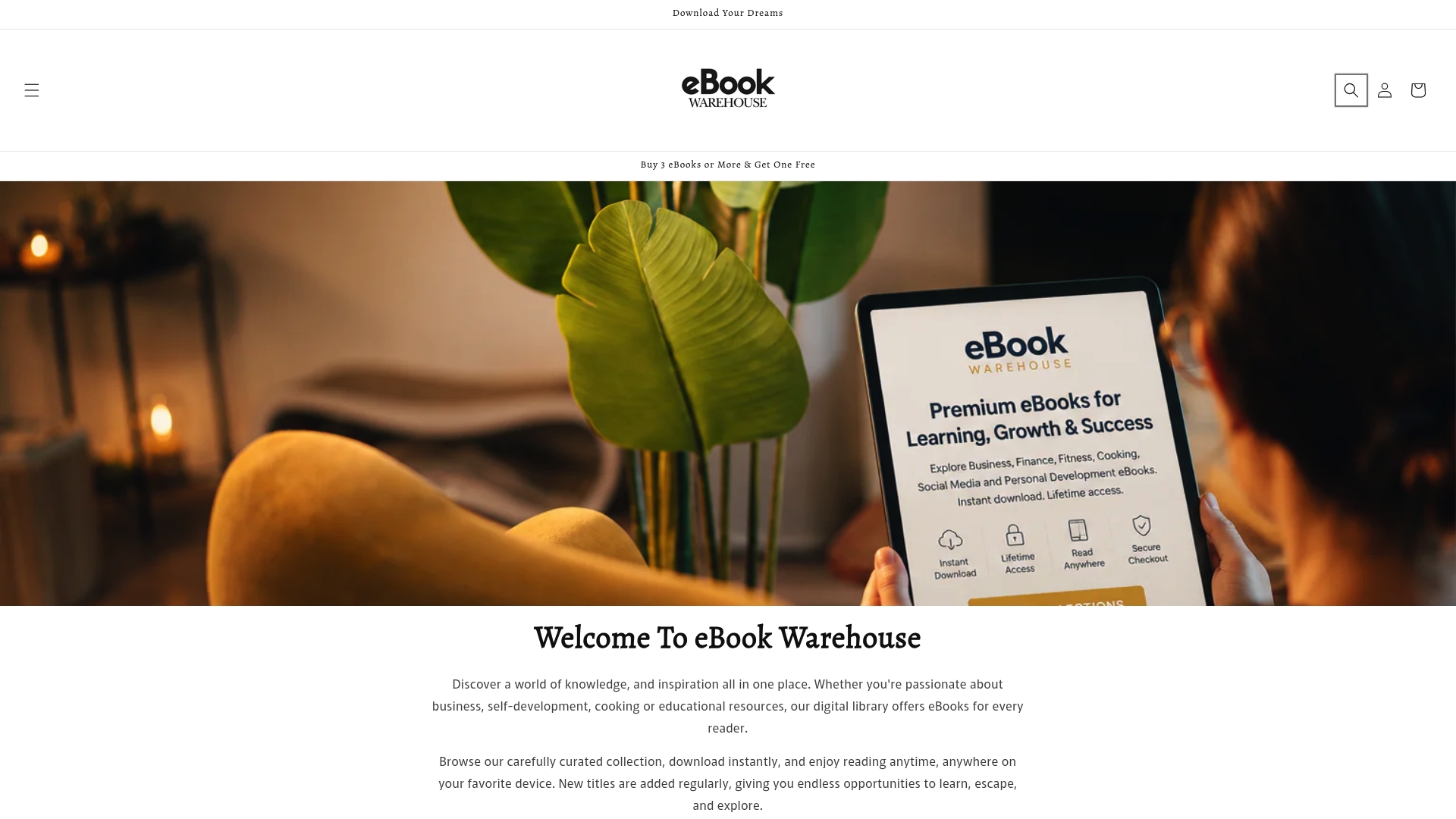
Ebook-warehouse carries downloadable PDFs across personal development, business, cooking, health, and social media. Every purchase is instant: pay, download, read on any device that opens a PDF. No monthly fee. No unlock limits. No catalog that changes without notice.
Current picks worth browsing:
- Personal productivity titles for self-improvement readers
- Cooking collections including niche recipe guides
- Business growth bundles for professional readers
Occasional promotions include buy-three-get-one-free offers on select titles. Browse the full catalog at Ebook-warehouse and pick up the titles you want to own permanently.
Useful sources and official links
- Slideshare
- Issuu | Publish digital flipbooks, magazines, and catalogs
- The 5 best Scribd Alternatives for PDF Hosting
- Kindle Unlimited vs Scribd (2026): 6-Month Real Test | AudiobookPicks
- Scribd Review: What It Is Now (And How Everand Fits In)
- Kindle Unlimited vs Scribd (2026): Catalog Size | EarnifyHub
- Scribd vs Kindle Unlimited: Best for You? | MinuteReads